English French German Spain Italian Dutch Russian Portuguese Japanese Korean Arabic Chinese Simplified

this widget by www.AllBlogTools.com
Showing posts with label Software. Show all posts

Choosing Recording Studio Software

Recording Studio Software offers individuals the tools and features on their computers that have long been available only in expensive professional recording studios. Whether you are looking for an advanced workstation to edit, modify and enhance musical tracks or simply need a portal to record musical tracks and patch parts and pieces together, Recording Studio Software offers that and more.

From creating synthesized lines, sequencing percussion lines and drum beats to modifying arrangement and structure, Recording Studio software programs give users the precision and creative control necessary to take raw tracks and transform them into professional-quality songs.

With additional support for hardware and MIDI controllers, Recording Studio software programs can operate as a hub, letting users make use of the software through line-out controls and implement, supplement and even combine sounds to make your tracks sound unlike any other.

Recording Studio software programs can require a great deal of computing power. That is why, to ensure the best levels of performance and the highest possible quality for finished musical tracks, computer specifications should exceed the basic requirements stated by the product. Knowing your own computer specs including available disc space, RAM memory, processor units, screen display resolution audio card and driver type can help you make an informed decision about which Recording Studio Software programs are right for you, and which ones would be better used on a higher-powered computer.

Not all Recording Studio software programs are equal. That said, here are some of the attributes that should be considering when purchasing a Recording Studio software program.

Evaluate this criteria before purchasing Recording Studio Software:

Audio Production Features
Recording Studio software programs should provide an array of tools and features to record, modify, manipulate and edit musical tracks. These features should be available within an intuitive, easy to use interface that reduces the learning curve for new users while helping experienced users advance their skill-set and proving enough tools and features for both new and experienced to craft, create, manipulate, modify, edit and record tracks.

Performance
While the performance of Recording Studio software programs is often dependent upon your computer’s specs, the software itself do impact what you can do and, moreover, how quickly and consistently with as little latency as you can do them. Knowing how well a Recording Studio software program performs under pressure or when tasked with intensive assignments is important to consider when selecting a program.

Input/Output
While most Recording Studio software programs can be operated free of any external hardware or MIDI controllers, evolving your skills as a musician and engineer often requires including additional hardware devices and MIDI controllers to enhance your sound and expand your program’s potential. In addition to considering the hardware that can be used with the program, it is important to consider what audio file formats the program is compatible with, and which file formats it can publish to.

Help/Support
No Recording Studio software program is complete without helpful resources and technical support to help users familiarize themselves with software program, troubleshoot technical issues and learn advanced techniques and methods for various stages of the recording process. Recording Studio software programs should include built-in and online resources like user-guides, help tabs, FAQ pages and user forums, as well as contact information for additional assistance like email or telephone. [source : Recording Studio Software]

How To Make Music With Program


The possibilities fo making music are definitely endless once you have a good music creator software! You can create unique songs over and over again, selecting from over a thousand top quality sounds and utilizing music creation methods and tools in order to make it sound fantastic.

But it doesn't stop there. Did you understand that once you utilize the better music creating software for music production, you can actually start gaining some fame and fortune as well? I'm not saying that you'll be the next Lady GagGa or Black Eyed Peas, but with a little help from modern technology, you will certainly be able to get the word out on your brand new musical productions, and here's how:

* Create YouTube music videos

* Sign up for a MySpace page and start networking (MySpace is great for music promotion)

* Make a Facebook fan page

* Create an entire album collection, burn some CDs, and sell them on a personal website or even on eBay

* Sell MP3 files of your music independently or through iTunes

It is actually not very difficult to achieve these things if your music is of great quality and sounds fantastic. People will begin to recognize you and perhaps even offer to pay you to produce music for them! It's really not as impossible as you might think.

So now we have to solve the issue that is most likely confusing you: What is the most effective music creator software?

There are more than a few programs to make music out there, and while there is not one perfect and almighty program for everyone, I can safely say that you start a great music production hobby using Sonic Producer.

This program appeals to a wide audience (beginners to experienced users) and is one of the most widely used music production programs today. It's best known for its unique integration of a user-friendly interface completely with learning resources, tutorials, and a helpful members area. The quality and variety of sounds, editing tools, and mixing techniques are some of the reasons why many people say its the best music making program.

Are you ready to start making music? You have nothing to lose and everything to gain. Go for it! 

Click Here to check out the good Music Creator Software and find out how you can create a lot of good quality beats using a technique to get you in the zone. Once you get in the zone you will be on good of your game.

Article Directory : http://ArticleDirectory.com

Tips For Rap Beat Instrumentals


HOW TO CREATE A GOOD SOUNDING BEAT USING A BEAT MAKER - THIS IS EASIER THAN YOU THINK

If you do learn that your song or beat is not sounding the way you wanted it to, do not be afraid to just trash the project and start from scratch. Before buying a beat maker, you need to make certain that it comes with plenty fo sound files that you may play around with, as well as easy export options. To produce a good sounding beat utilizing your beat creator is now simpler than it ever used to be, since almost all of the tools for making beats now come with a cheaper interface multi-track sequencer with a mp3 transfer option. When you create a beat, it's always a good idea that you start with your percussion or drum sounds first.

HOW TO MAKE YOUR OWN RAP BEATS?

There are a variety of things that you can certainly do to help you with taking your music to the next level and here are a number of tips to assist you in doing so. It is not that hard to create an OKAY sounding music track, but it is very hard to create tracks that ends up sounding like a professional beat.

MAKE BEATS JUST LIKE A PRO

Producing can be identified as when you generate music or beats for your Hip Hop song. It is always best to know more about beat making software before you get started with creating your master piece, as opposed to being clueless about it. The MPC sampler and the MV8800 are similar in design and function.

WHAT SOFTWARE TO USE IF YOU WANT TO LEARN HOW TO MAKE YOUR OWN RAP BEATS

Korg Triton Extreme
A number of the better beat creators involves the Motif ES8 Workstation, the Korg Triton Extreme, the Roland Fantom X6, the MPC Sampler and the Roland's MV8800. The Korg Triton Extreme is one and the best originators in the Hip Hop world of today.


THE BEST AND MOST POPULAR SOFTWARE ONLINE

The Fruity Loops software is good for beginners because of its affordable rates and it is simple to utilize functions. WHY is Sonic Producer better than Fruity Loops, well it is cheaper than the Fruity Loops starters.


Click Here to check out the best programs to make beats that will let you to Create Beats online easily. With the right beat making program you can begin making nice music pretty easily.


Article Directory : http://ArticleDirectory.com
 

How To Make Music At Your Home With Music Software


In the past, creating music was a costly thing, but with cheap beat software that is no longer the case. Now, one need not invest in a full compliment of instruments and lessons to express themselves or their vision through music.

Instead, musicians are catapulting their careers with just a laptop and a natural feel for rhythm and sound. If you, like numerous artists who are getting their start, have a lot of ideas but little money to invest, think about utilizing a beat program to make a inexpensive home recording studio.

One of the best benefits of a beat program is that you don't require the ability to read music. Instead, users can effortlessly work with a large variety of prerecorded instrumentals and percussive sounds with one click of a mouse. This makes it easier to compose by ear, as you can listen to changes as you make them. Saving is easy, and many musicians work on a number of beats at once, returning to them at their leisure.

While sampling has turned into a well liked means of getting beats, using copyrighted material can set you up for failure. If you hope to market and profit from your music in the future, and most people do, sampling can be a huge legal obstacle, and one that can prevent you from getting a contract from a label.

Beat software enables any person to make their own custom beats. As these beats represent your original work, you own all the rights. This means that you are free to market the songs in any way you would like, without opening yourself up to legal challenges in the future.

Beat programs have grown into cheap and easy to use, that it is now being used by serious musicians and hobbyists alike. The best software is designed to be easy to learn, and can be used to create music in almost any beat driven genre.

Click Here to check out the best Music Creator Software and discover how you can make a lot of best quality beats using a method to get you in the zone. Once get in the zone you will be on best of your game.
Article Source: http://ArticleDirectory.com

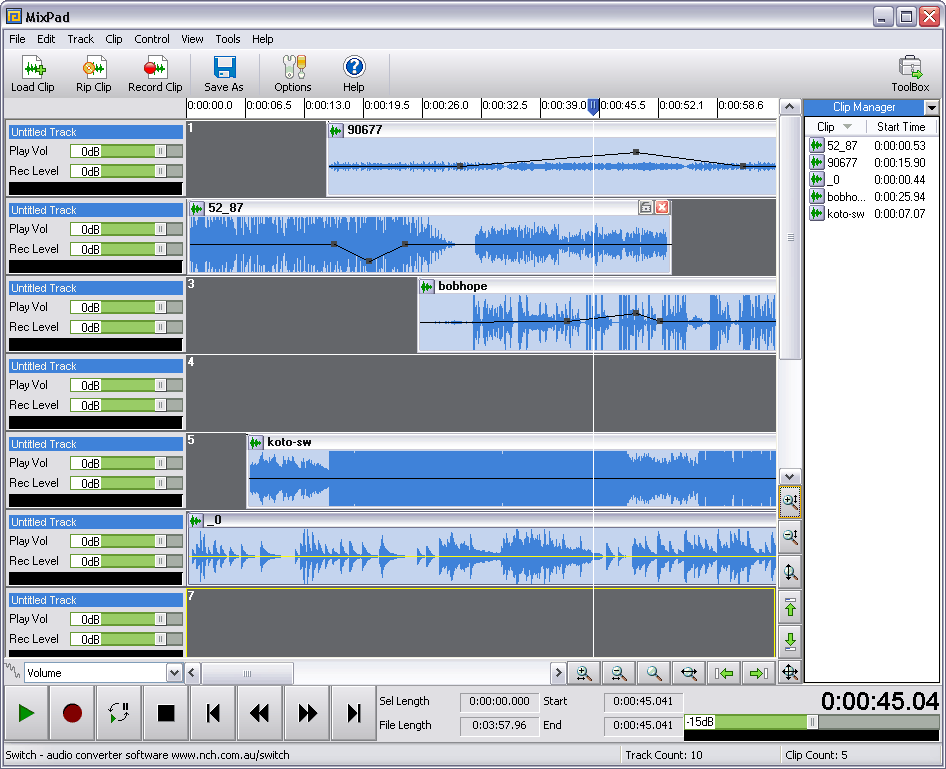
Software For Mixing Music

by: James Jackson

Have you ever dreamed of creating your own music, being your own producer, or becoming an excellent DJ? If your response to this question is an affirmative, you will need to get familiar with a handy music mixing software for your beat creation.

To become great at mixing music, I'd suggest you really take the time to work out how music mixing software works so that you can get the most out of whatever program you decide to use. The music mixing software is an exceptional tool for anyone who wants an easy way to cut and paste music from various sources to create a different sound An awesome music mixing software should also be able to mix the speed and tempo of two or more songs. More importantly, these things should be done without sacrificing the quality of the end product.

So how exactly do you use a music mixing software? The basic interface of any music mixing software should be self-explanatory no matter which brand you use. To start off you need to choose what audio files you want to mix together. Have an idea of what you want to play with before you start.

You will soon discover how to create a different sound that appeals to your audience more.

After you've decided on which songs to you, you will have to load these into the music mixing software so you can identify and fiddle with the different components of the songs. You can set the setting to zero initially so you can listen to each of the components of the song one by one.

When you've listened to the different components, the next step is to bring them together and listen to the way the sounds harmonize.

Find the main part of the track you chose and fix the settings for it so it can be your backdrop for the whole song Fiddle with the volume until you get to a point where you can hear the other sounds apart from the main track you selected. Keep trying it out until you get it just right. Soon enough, it will be clear to you that adjusting the tone, speed and tempo this way will result in the musical arrangement that suits your idea best.

After this, the real fun starts. You can share the new arrangement you came up with in the music mixing software with your friends and family so that they can tell you what they think of it. Depending on the feedback you receive, you can make any little changes that you feel are necessary.

Now, you can tell your friends all about your artistic experiments using the music mixing software!

Learn more at: http://makeyourbeatsonpc.com/software-for-mixing-music
About The Author
James is a consultant specialized in music production software. Take a visit to his site to read reviews and catch useful hints as: http://makeyourbeatsonpc.com/software-for-mixing-music
Related Posts with Thumbnails